Craft your forge // Build your project // Grow your community freely
1---
2title: 0.5.0 plugins
3og:title: 0.5.0 plugins
4og:description: What is GitRoot without its plugins?
5description: What is GitRoot without its plugins?
6og:image: https://gitroot.dev/branches/v0.5-plugins/blog/version-0.5.0-plugins-firefly.png
7og:image:alt: Screenshot of the firefly plugin, it's a status plugin, we see gitroot.dev is up and running, also @forge@gitroot.dev (gotosocial of gitroot) is running.
8date: 2026/10/30
9emoji: 🧩
10---
11 12# What is GitRoot without its plugins?
13 14In the [release 0.5.0 blog post](./version-0.5.0.md) I have only talked about the GitRoot core code. But GitRoot is a forge where plugins take a lot of space. In the future I want to decouple GitRoot and its plugins. I hope to stabilize the plugin-sdk, release them, so that you will be able to create your own plugins.
15 16But today, GitRoot and [officials plugins](../plugins/scope_gitroot.md) are linked by the version. So let me explain what they can do in this new version.
17 18## All plugins are compatible with the 0.5.0
19 20All plugins are compatible with the 0.5.0 plugin-sdk. What does that mean? Every time you see a **BREAKING** and `plugin` in the [changelog](../CHANGELOG.md), it means I had to change the code of the plugin-sdk and recompile plugins with that new code (sometimes I need to change the code of the plugin, sometimes not). So when you see `compatible with gitroot plugin-sdk 0.5.0` in the changelog of a plugin, it means that the plugin is good to run inside this GitRoot version.
21 22I'll present here only the most important features, for details you can read the changelog of each plugin.
23 24## Firefly in zig
25 26First, let me introduce [Firefly](../plugins/name/firefly.md): add URLs to call and Firefly will generate beautiful status pages for them. Yes, it's a status page directly integrated into your forge, so no need to depend on a third-party service. Of course, it's useful only if the app observed is not on the same host as your forge. So it's totally useless for GitRoot. But as an example, you can see the [status page of gitroot on gitroot](https://gitroot.dev/status/).
27 28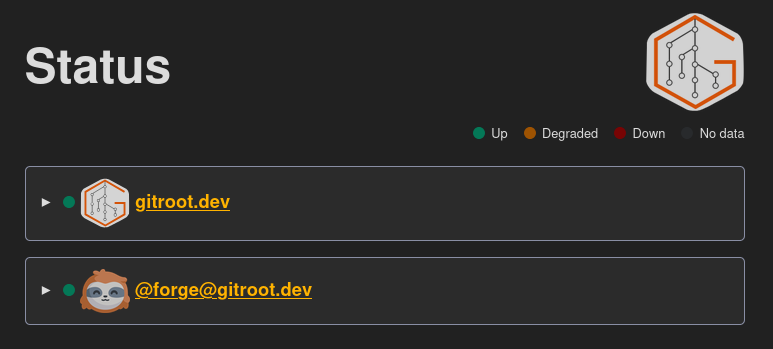
29 30I'm proud because it's my first code in the [zig](https://ziglang.org/) language. Not everything is perfect, of course, but I love the language itself, so I will make other plugins and rework them when needed. If you are Zig lovers too, don't hesitate to help me.
31 32## Silo, lots of new things
33 34[Silo](../plugins/name/silo.md): from files and metadata, Silo generates indexes to find files more easily. I have added a lot of features into this milestone.
35 36You can now `sort` the rendered list by the files which each item links to. I use it to render all the `TODO`s in GitRoot, [in the todo board](../boards/todos.md).
37 38Now Silo can render the list directly to the web. Useful to not encumber the git repositories with redundant lists. For example, I use it to render plugins in [alphabetical order](../plugins/) or by [scope](../plugins/scope_gitroot.md).
39 40Furthermore, as you can see in the [plugins page](../plugins/), Silo can now render lists by alphabetical group. To render them, I have added a new property `groupBy` which allows you to tell Silo which property you want to group your list items by.
41 42The `groupBy`, `title`, `desciption` and `to` properties can contain `$variable`. These variables will be interpreted when Silo renders the list. So, for example, if you want to render the title of a list with a special metadata of the content, you can:
43 44```yaml
45- selects:
46 - "purl: pkg:gitroot/[^/]+/([^@]+)" 47 - "purl: pkg:gitroot/([^/]+)" 48title: Plugins for scope $select[1]
49``` 50 51This means that you select the scope and name of the PURL plugin and render the name into the title. A way to add metadata into the rendered list is to use the new `metadata` property.
52 53> [!NOTE]
54> The silo plugin use the [standard regexp](https://pkg.go.dev/regexp) from go to extract selects.
55 56With all of that, dynamic boards can be created. From files to index files with metadata, you can create indexes of indexes. An example is the [scope page](https://gitroot.dev/plugins/scope.html). Silo takes all plugins from the [plugins/name directory](https://gitroot.dev/worktree/plugins/name/index.html), generates a page which is an index of all scopes, and then generates a page for each. Today only the [gitroot scope](../plugins/scope_gitroot.md) exists, but I hope for a lot more in the future.
57 58Not related, but a good addition to the Silo plugin is the `custom` data format. It permits to render each element in the format you want (by default, only list and table were possible). I use it to render the [blog posts index](../blog/).
59 60> [!NOTE]
61> To find examples on how to configure all of that, look at the [silo configuration](https://gitroot.dev/worktree/.gitroot/plugins.yml.html#L60) of gitroot.dev instance.
62 63## Apex is the web view
64 65A lot of tiny, but useful things have been added to the [apex](../plugins/name/apex.md) plugin. Apex is the plugin that renders the files from your git repository to the web. You configure the `header`, `footer`, `menu`, and it takes care of assembling all of that with your `<main>` content. Today it only renders HTML and markdown (through the [apex_markdown plugin](../plugins/name/apex_markdown.md)).
66 67So, the first addition is to export a `renderHtml` function. With that in place, all other plugins can render something with your header, menu, footer and the right CSS. Without it, most plugins rendered only the `content` of the page withtout `<head>`. For example, see what Firefly looks like without Apex:
68 69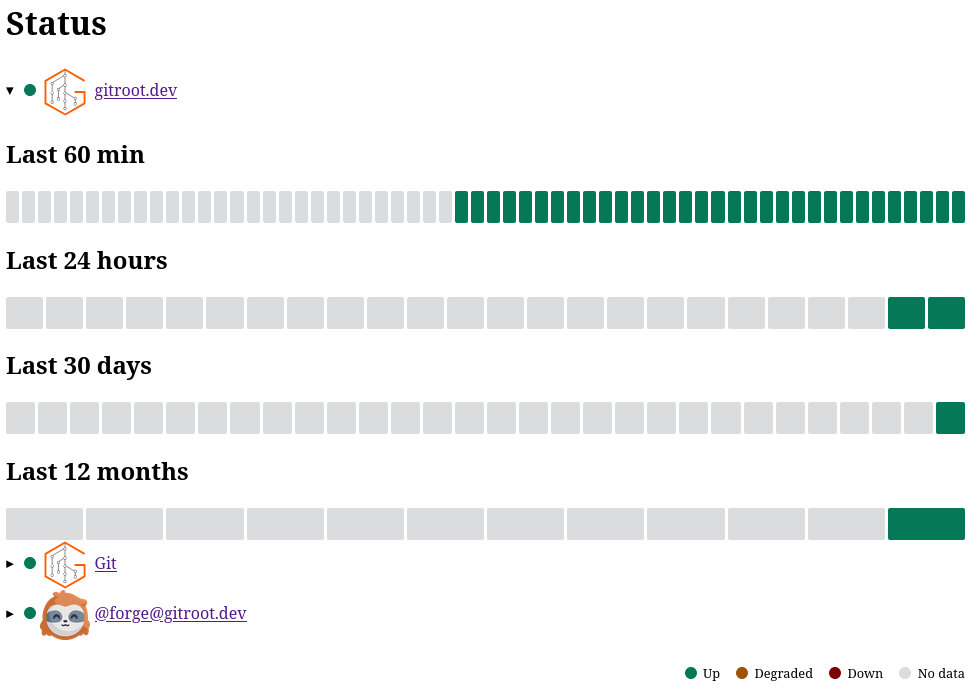
70 71A new `layout` has been added: `slide`. Previously, the property `layout` could be filled with a path and Apex used it (if it didn't exist, Apex created it with the default one inside). But if instead of a path you set `issue`, Apex will render all matching paths with a particular layout: see [any issue](../issues/close/v0.5.0/88d7-anonymous-can-create-branch.md), Apex has added metadata before the page, and grouped all content inside an `<article>` instead of a `<br>` like you can see in the [original markdown page](https://gitroot.dev/worktree/issues/close/v0.5.0/88d7-anonymous-can-create-branch.md.html).
72 73Following this strategy, the new `slide` layout renders the page with the [slide.css](../app/plugins/apex/resources/styles/slide.css) and groups all page breaks into `<section>` as required by the CSS.
74 75If Apex renders markdown through the apex_markdown plugin, how is that possible? All the magic resides in a new property added in the apex_markdown plugin. This property is `horizontalRuleMetadatas`, with that, Apex can instruct the markdown renderer how to render page breaks.
76 77Another addition to apex_markdown is the ability to render callouts for blockquotes and details/summary. To render a callout, use this in your markdown:
78 79```md
80> [!NOTE]
81> This a note callout.
82``` 83 84Which renders on the web as:
85 86> [!NOTE]
87> This a note callout.
88 89Today, the possibilities are (but in the future I want to make them configurable):
90 91```go
92var calloutColor = map[string]string{
93"[!NOTE]": "#006ac7",
94"[!WARNING]": "#be4700",
95"[!ERROR]": "#f00",
96}
97``` 98 99Following the same philosophy, to render details/summary:
100101```md
102> [!DETAILS] This is a summary
103> This is the details
104```105106Which renders on the web as:
107108> [!DETAILS] This is a summary
109> This is the details
110111Finally, in a last-minute change before the release, I have added the metadata `toc: true` to be able to render a table of contents, because the [v0.5.0 article](./version-0.5.0.md) was too long.
112113## Grafter diff
114115An important (in UX, not size) change in the [grafter plugin](../plugins/name/grafter.md) is that it now renders commit diffs from the start. Grafter is the plugin responsible for managing contributions, it permits discussing what has been done and finally merging (or not) the contribution.
116117Previously, Grafter displayed diffs only after the property `status` was set to `review`. But that was confusing. Now, from the start, it shows diffs.
118119And now that the Apex plugin can render summary/details, Grafter uses it to render reports from other plugins. You can see the result in the graft [of this post](../grafts/v0.5-plugins.md).
120121## Pollen render content
122123If you use [pollen](../plugins/name/pollen.md), you can delete the property `link` as it is calculated directly from the forge configuration. Pollen is the plugin responsible for communicating with the outside of your forge. Today it uses only RSS.
124125But the biggest change is the ability to render the content of files in addition to the commits. Previously, Pollen rendered only commit metadata (title, description, author...). Now it can render the content of files to have a true RSS for your issues, grafts, or even blog posts. Don't forget to subscribe to the [blog rss](https://gitroot.dev/rss/blog.xml) of this instance.
126127## What next?
128129One big thing I wanted to do before the [0.5.0 release](./version-0.5.0.md) (but ran out of time) was to change how Apex renders links. Today all links are absolute with a trick in the html page (`<basehref="https://gitroot.dev/">`), I have done that because the [404 page](./no-existing.html) needs to be rendered everywhere in the repository. Unfortunately, that makes too many bugs with bad linking. So I want to revert that as priority one (maybe keep the trick only for the 404 page).
130131After that, I want to better render Git in the web. A lot of missing concepts need to be rendered, `commit`, `branch` are the first ones. So I will add an `apex_git` plugin. And if I have time, an `apex_gitroot` plugin to render specific GitRoot files like `users.yml`, `plugins.yml` or `repositories.yml`.
132133I have grouped multiple related issues in the [apex board](../boards/status_apex_git.md). That will be my priority, but of course, as I change my mind a lot, that's not a promise of what will be done.
134135_Special thanks to `Ryuno-Ki` from the [#gitroot:matrix.org](https://matrix.to/#/#gitroot:matrix.org) Matrix room for reviewing and correcting this article. Want to help with future posts? Join us in the room!_